
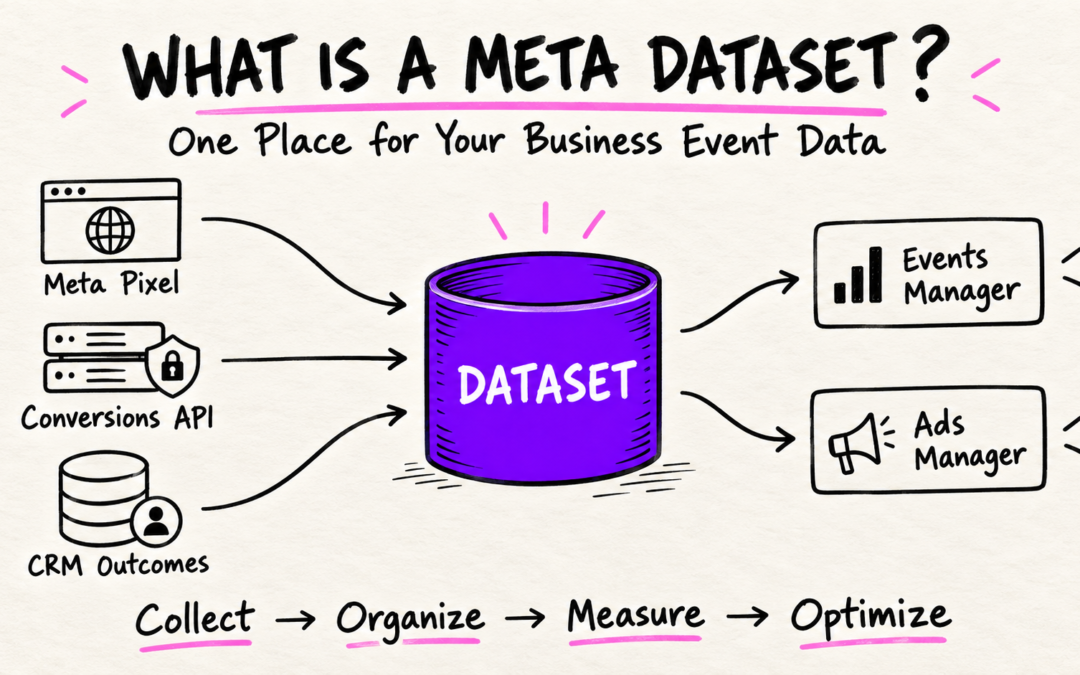
The word dataset appears throught Meta Events manager, but its purpose is not always obvious.
Is it another name for Meta Pixel? Did Meta replace Pixels with datasets? Should you create a separate datset for your website, Conversion API and CRM?
The short answer is NO.
The dataset is a central location in Meta Events Manager where Meta organizes events received from your connected business sources. The Pixel is one of those sources not the entire dataset.
How a Dataset Works
Imagine someone clicks on your ad, visits your website and submits an enquiry form.
The journey might be:
Ad Click → PageView → ViewContent → Lead
The Pixel detects browser activity and sends those events to Meta. If you use Conversion API, your server may send corresponding server events. Your CRM later report that the lead became qualified or booked an appointment.
Those signals can be organized in a same container or dataset.
Pixel Events + CAPI Events + CRM Outcomes → Meta dataset
Events Manager lets you organize and inspect the data and Ads Manager uses eligible events for reporting and campaign optimization.
Dataset vs Meta Pixel
As an advertiser you may feel confused a because the Dataset ID and Pixel ID are the same. However, there is a clear difference between them. Meta Pixel is a javascript code that collect all events from the website browser while the dataset act as a container that collects and organize event data receieved from different sources.
What Can Send Events to a Dataset
Depending on your setup and available integrations, a dataset may receive events from:
- Meta Pixel
- Conversions API
- Mobile apps
- CRM systems
- Offline business activity
- Physical stores
- Supported business-messaging systems
This does not happen automatically. Every source must be connected and configured correctly.
How Many Datasets Do You Need
You do not normally need separate datasets for:
- Every campaign
- Every landing page
- Every service
- Every event
- Pixel and CAPI
- Different Meta ad accounts promoting the same business
If a construction company offers new-home construction, renovation and interior design, it can usually use one dataset. Parameters, URLs or custom conversions can separate the services.
Separate datasets make more sense for unrelated businesses, independent brands, client accounts or testing environments that should not mix with production data.
What to Review Inside a Dataset
Depending on your account and implementation, Events Manager may display:
- Received events
- Browser and server connection methods
- Test Events
- Diagnostics
- Event Parameters
- Event Match Quality
- Conversion API coverage
- Connected integrations
- Dataset settings
Do not assume that a event is correct merely because it appears there.
Verify that it fires at the correct moment, fires only once, use accurate parameters and represent a genuine business action.
Why Data Quality Matters
Meta cannot determine weather your implementation logic makes business sense.
If Lead event fires when someone opens the contact page, Meta may optimize for page visitors rather than completed enquries. If Purchase event fires before payment confirmation, your revenue reporting becomes unreliable.
Good dataset management requires:
- Accurate event names
- Correct event timing
- Browser and server deduplication
- Valid value and currency
- Appropriate customer data handling
- Regular testing after website or CRM changes
- Complaince with applicable privacy and consent requirements
Final Thoughts
A dataset is not simply a renamed Pixel. It is the structure Meta uses to organize events from connected sources.
The complete process is:
Customer action → Pixel, CAPI or CRM → Dataset → Events Manager → Ads Manager
A dataset is only as useful as the information sent to it. Clean, correctly timed events give you more trustworthy reporting and give Meta better signals for campaign optimization.